Bring your GPU to the cloud
AI agents on your VPS need GPU power. TensorLay tunnels your home graphics card to the cloud — securely, in one click.
Windows 10/11 · Free forever · No account required
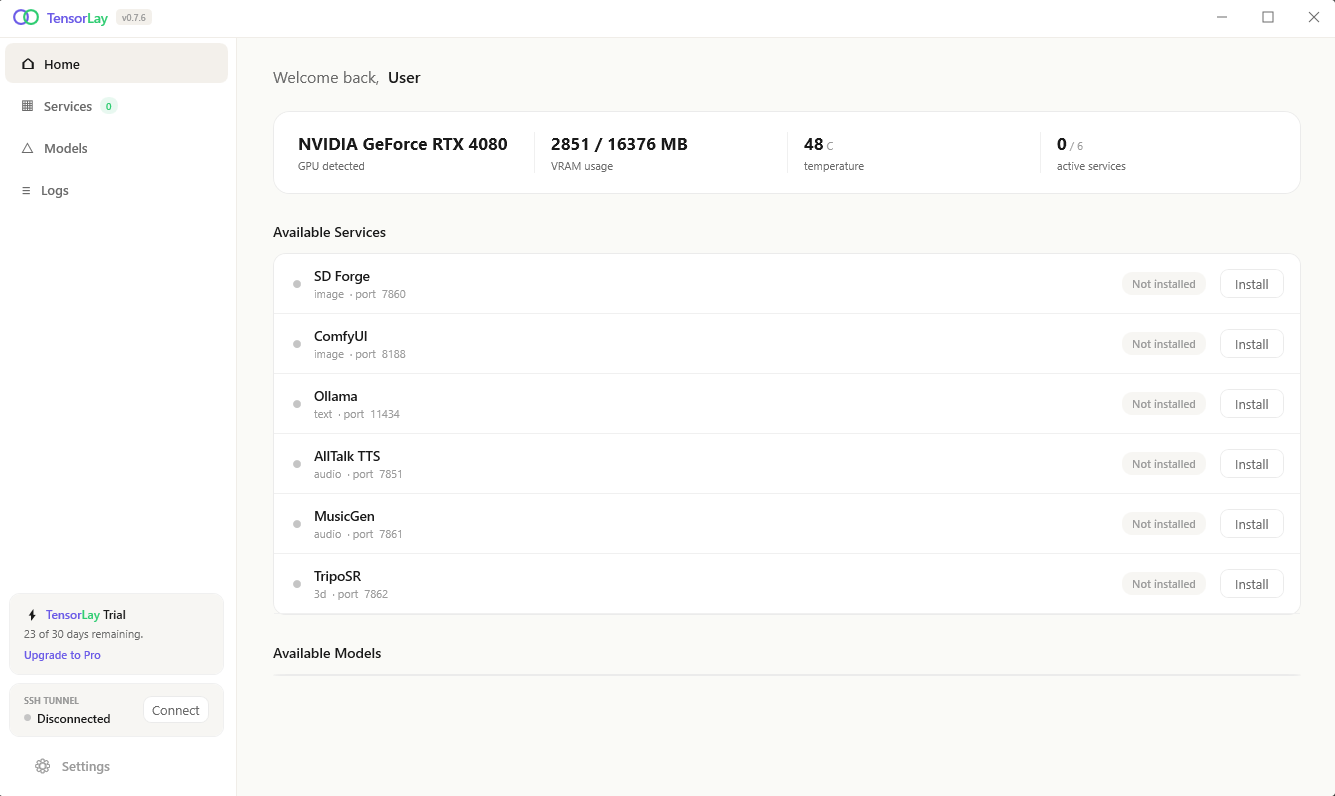
Everything you need to power AI remotely
Manage AI services, monitor your GPU, and tunnel everything to your VPS — all from a single app.
One-Click Services
Install, start, and stop AI services like Stable Diffusion, ComfyUI, Ollama with a single click.
SSH Tunnel
Secure SSH tunnel connects your local services to any VPS. Auto-reconnect, no port forwarding needed.
GPU Monitoring
Real-time VRAM, temperature, power draw, and GPU load monitoring right in the app.
Up and running in 3 steps
No complex configuration. No port forwarding. Just install, pair, and start generating.
Install TensorLay
Download and install the app on your Windows PC with an NVIDIA GPU.
Set up your VPS
Run one command on your VPS to install the relay.
curl -sL https://tensorlay.com/install.sh | sudo bash
Connect & Go
Enter your VPS IP and pairing code. SSH keys exchange automatically.
6 AI services, ready to go
Image generation, LLMs, text-to-speech, music, and 3D — all managed from one dashboard.
SD Forge
Stable Diffusion image generation
ComfyUI
Node-based pipelines & ControlNet
Ollama
LLM — chat, code, vision
AllTalk TTS
Voice synthesis & cloning
MusicGen
AI music generation
TripoSR
3D model generation from images
Ready to unleash your GPU?
TensorLay is free and open source. If it's useful to you, support development on GitHub Sponsors.
Windows 10/11 · Requires NVIDIA GPU · ~68 MB